


Page 62 - CC 2019 GD Look Inside
P. 62
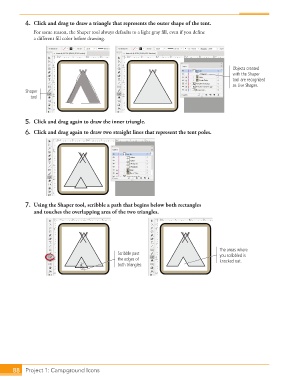
4.  Click and drag to draw a triangle that represents the outer shape of the tent.
                   For some reason, the Shaper tool always defaults to a light gray fi ll, even if you defi ne
                   a diff erent fi ll color before drawing.


                                                                                               Objects created
                                                                                               with the Shaper
                                                                                               tool are recognized
                                                                                               as Live Shapes.
                Shaper
                  tool


               5.  Click and drag again to draw the inner triangle.
               6.  Click and drag again to draw two straight lines that represent the tent poles.


               7.  Using the Shaper tool, scribble a path that begins below both rectangles
                   and touches the overlapping area of the two triangles.


                                                                                          The areas where
                                                   Scribble past                          you scribbled is
                                                   the edges of                           knocked out.
                                                   both triangles.


           88     Project 1: Campground Icons

