


Page 67 - CC 2019 GD Look Inside
P. 67
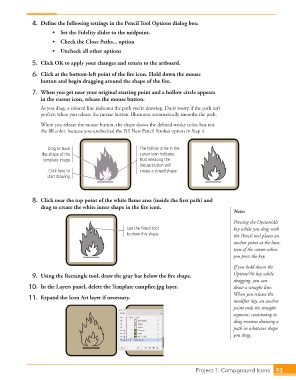
4.  Define the following settings in the Pencil Tool Options dialog box:
                           •    Set the Fidelity slider to the midpoint.
                           •    Check the Close Paths... option

                           •    Uncheck all other options

                   5.  Click OK to apply your changes and return to the artboard.
                   6.  Click at the bottom-left point of the fire icon. Hold down the mouse
                      button and begin dragging around the shape of the fire.
                   7.  When you get near your original starting point and a hollow circle appears
                      in the cursor icon, release the mouse button.
                      As you drag, a colored line indicates the path you’re drawing. Don’t worry if the path isn’t
                      perfect; when you release the mouse button, Illustrator automatically smooths the path.
                      When you release the mouse button, the shape shows the defined stroke color, but not
                      the fill color, because you unchecked the Fill New Pencil Strokes option in Step 4.


                         Drag to trace                      The hollow circle in the
                      the shape of the                      cursor icon indicates
                       template image.                      that releasing the
                                                            mouse button will
                         Click here to                      create a closed shape.
                        start drawing.


                   8.  Click near the top point of the white flame area (inside the first path) and
                      drag to create the white inner shape in the fire icon.
                                                                                                Note:

                                                                                                Pressing the Option/Alt
                                                       Use the Pencil tool                      key while you drag with
                                                       to draw this shape.                      the Pencil tool places an
                                                                                                anchor point at the loca-
                                                                                                tion of the cursor when
                                                                                                you press the key.
                                                                                                If you hold down the
                   9.  Using the Rectangle tool, draw the gray bar below the fire shape.        Option/Alt key while
                                                                                                dragging, you can
                  10.  In the Layers panel, delete the Template campfire.jpg layer.             draw a straight line.
                                                                                                When you release the
                  11.  Expand the Icon Art layer if necessary.
                                                                                                modifier key, an anchor
                                                                                                point ends the straight
                                                                                                segment; continuing to
                                                                                                drag resumes drawing a
                                                                                                path in whatever shape
                                                                                                you drag.


                                                                                 Project 1: Campground Icons    93

