


Page 64 - CC 2019 GD Look Inside
P. 64
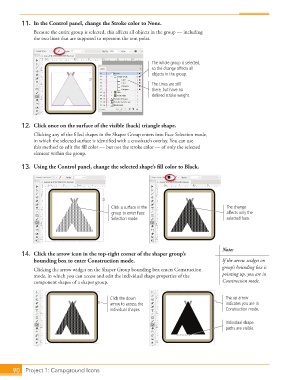
11.  In the Control panel, change the Stroke color to None.
                   Because the entire group is selected, this aff ects all objects in the group — including
                   the two lines that are supposed to represent the tent poles.


                                                                 The whole group is selected,
                                                                 so the change affects all
                                                                 objects in the group.

                                                                 The Lines are still
                                                                 there, but have no
                                                                 defined stroke weight.


               12.  Click once on the surface of the visible (back) triangle shape.

                   Clicking any of the fi lled shapes in the Shaper Group enters into  Face Selection mode,
                   in which the selected surface is identifi ed with a crosshatch overlay. You can use
                   this method to edit the fi ll color — but not the stroke color — of only the selected
                   element within the group.

               13.  Using the Control panel, change the selected shape’s fi ll color to Black.


                                                 Click a surface in the                      The change
                                                 group to enter Face                         affects only the
                                                 Selection mode.                             selected face.


                                                                                           Note:
               14.  Click the arrow icon in the top-right corner of the shaper group’s
                   bounding box to enter Construction mode.                                If the arrow widget on
                   Clicking the arrow widget on the Shaper Group bounding box enters  Construction   group’s bounding box is
                   mode, in which you can access and edit the individual shape properties of the   pointing up, you are in
                   component shapes of a shaper group.                                     Construction mode.


                                                 Click the down                              The up arrow
                                                 arrow to access the                         indicates you are in
                                                 individual shapes.                          Construction mode.

                                                                                             Individual shape
                                                                                             paths are visible.


           90     Project 1: Campground Icons

