


Page 58 - CC 2019 GD Look Inside
P. 58
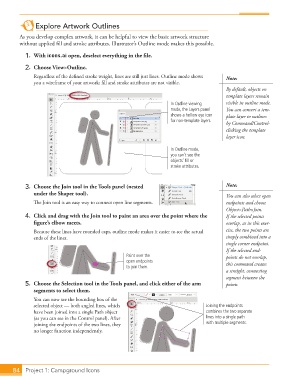
Explore Artwork Outlines

              As you develop complex artwork, it can be helpful to view the basic artwork structure
              without applied fi ll and stroke attributes. Illustrator’s  Outline mode makes this possible.

               1. With icons.ai open, deselect everything in the fi le.

               2.  Choose View>Outline.
                   Regardless of the defi ned stroke weight, lines are still just lines. Outline mode shows   Note:
                   you a wireframe of your artwork; fi ll and stroke attributes are not visible.
                                                                                             By default, objects on
                                                                                               template layers remain
                                                                        In Outline viewing   visible in outline mode.
                                                                        mode, the Layers panel   You can convert a tem-
                                                                        shows a hollow eye icon   plate layer to outlines
                                                                        for non-template layers.
                                                                                             by Command/Control-
                                                                                             clicking the template
                                                                                             layer icon.

                                                                        In Outline mode,
                                                                        you can’t see the
                                                                        objects’ fill or
                                                                        stroke attributes.


               3.  Choose the  Join tool in the Tools panel (nested                          Note:
                   under the Shaper tool).                                                   You can also select open
                   Th  e Join tool is an easy way to connect open line segments.             endpoints and choose
                                                                                             Object>Path>Join.
               4.  Click and drag with the Join tool to paint an area over the point where the   If the selected points
                   fi gure’s elbow meets.                                                    overlap, as in this exer-
                   Because these lines have rounded caps, outline mode makes it easier to see the actual   cise, the two points are
                   ends of the lines.                                                        simply combined into a
                                                                                             single corner endpoint.
                                                                                             If the selected end-
                                                       Paint over the                        points do not overlap,
                                                       open endpoints                        this command creates
                                                       to join them.
                                                                                             a straight, connecting
                                                                                             segment between the
               5.  Choose the  Selection tool in the Tools panel, and click either of the arm   points.
                   segments to select them.
                   You can now see the bounding box of the
                   selected object — both angled lines, which                        Joining the endpoints
                   have been joined into a single Path object                        combines the two separate
                   (as you can see in the Control panel). After                      lines into a single path
                   joining the endpoints of the two lines, they                      with multiple segments.
                   no longer function independently.


           84     Project 1: Campground Icons

