


Page 60 - CC 2019 ID Look Inside
P. 60
More about Working with Fonts

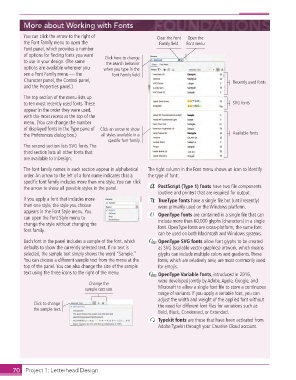
               You can click the arrow to the right of            Clear the Font   Open the
                the  Font Family menu to open the                  Family field  Font menu
                  Font panel, which provides a number
                of options for fi nding fonts you want   Click here to change
                to use in your design. (The same   the search behavior
                options are available wherever you   when you type in the
                see a Font Family menu — the     Font Family field.
                Character panel, the Control panel,                                             Recently used fonts
                and the  Properties panel.)

                The top section of the menu lists up
                to ten most  recently used fonts. These                                         SVG fonts
                appear in the order they were used,
                with the most recent at the top of the
                menu. (You can change the number
                of displayed fonts in the  Type pane of  Click an arrow to show
                the  Preferences dialog box.)   all styles available in a                       Available fonts
                                                specific font family.
                The second section lists SVG fonts. The
                third section lists all other fonts that
                are available to InDesign.

                The font family names in each section appear in alphabetical   The right column in the Font menu shows an icon to identify
                order. An arrow to the left of a font name indicates that a   the type of font:
                specifi c font family includes more than one style. You can click
                the arrow to show all possible styles in the panel.    PostScript (Type 1) fonts have two fi le components
                                                                   (outline and printer) that are required for output.
                If you apply a font that includes more               TrueType fonts have a single fi le but (until recently)
                than one style, the style you choose               were primarily used on the Windows platform.
                appears in the Font Style menu. You                  OpenType fonts are contained in a single fi le that can
                can open the  Font Style menu to                   include more than 60,000  glyphs (characters) in a single
                change the style without changing the              font. OpenType fonts are cross-platform; the same font
                font family.
                                                                   can be used on both Macintosh and Windows systems.
                Each font in the panel includes a sample of the font, which     OpenType SVG fonts allow font glyphs to be created
                defaults to show the currently selected text. If no text is   as SVG (scalable vector graphics) artwork, which means
                selected, the sample text simply shows the word “Sample.”   glyphs can include multiple colors and gradients. These
                You can choose a different sample text from the menu at the   fonts, which are relatively new, are most commonly used
                top of the panel. You can also change the size of the sample   for emojis.
                text using the three icons to the right of the menu    OpenType Variable fonts, introduced in 2016,
                                                                   were developed jointly by Adobe, Apple, Google, and
                                        Change the
                                       sample text size            Microsoft to allow a single font fi le to store a continuous
                                                                   range of variants. If you apply a variable font, you can
                                                                   adjust the width and weight of the applied font without
                   Click to change                                 the need for different font fi les for variations such as
                   the sample text.
                                                                   Bold, Black, Condensed, or Extended.
                                                                    Typekit fonts are those that have been activated from
                                                                   Adobe Typekit through your Creative Cloud account.


           70     Project 1: Letterhead Design

