


Page 56 - CC 2019 ID Look Inside
P. 56
STAGE 4 / Creating and Formatting Basic Text


              InDesign is ultimately a page-layout application; page layout means combining text and graphic
              elements in a meaningful way to convey a message. Text can be a single word (as in the logo used in
              this project) or thousands of pages of consecutive copy (as in a dictionary). Virtually every project
              you build in InDesign will involve text in one way or another; this letterhead is no exception.


                    Create a Simple Text Frame
              Adding text to a page is a relatively simple process: draw a frame, and then type.    Note:
              In this exercise, you’ll create a new text frame and add the client’s tag line, then apply
              some basic formatting options to style the text.                               Remember from the
                 Keep in mind this project is an introduction to creating elements on a layout   Getting Started section
              page; there is far more to professional typesetting than the few options you use here.   at the beginning of this
              InDesign provides extremely precise control over virtually every aspect of every   book: to complete the
              letter and word on the page. In the following projects, you will learn about the vast   projects in this book,
              number of options available for setting and controlling type, from formatting a   you should install and
              single paragraph to an entire multi-page booklet.                              activate the ATC fonts
                                                                                             provided with the book’s
                1.  With gcm-letterhead.indd open, select the Type tool in the Tools panel.   resource files.
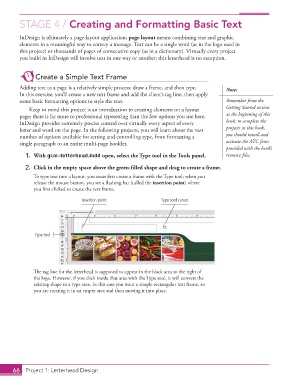
                2.  Click in the empty space above the green-filled shape and drag to create a frame.

                   To type text into a layout, you must first create a frame with the Type tool; when you
                   release the mouse button, you see a flashing bar (called the insertion point) where
                   you first clicked to create the text frame.
                                      Insertion point               Type tool cursor


                    Type tool


                   The tag line for the letterhead is supposed to appear in the black area to the right of
                   the logo. However, if you click inside that area with the Type tool, it will convert the
                   existing shape to a type area. In this case you want a simple rectangular text frame, so
                   you are creating it in an empty area and then moving it into place.


           66   Project 1: Letterhead Design

