


Page 64 - CC 2019 ID Look Inside
P. 64
Place an External Text File

              You just learned how to create a text frame and create new text. You can also import
              text created in an external word-processing application, which is a common situation
              when creating page-layout jobs (more common, perhaps, than manually typing text
              in a frame). In this exercise, you import text saved in a rich-text format ( RTF) fi le,
              which can store type-formatting options as well as the actual text.

               1. With gcm-letterhead.indd open, make sure nothing is selected in the
                   layout and then choose File> Place.
                   Remember, you can choose Edit>Deselect All, or simply click in an empty area of the
                   workspace to deselect any selected objects.

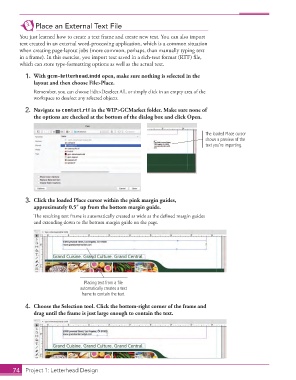
               2.  Navigate to contact.rtf in the WIP>GCMarket folder. Make sure none of
                   the options are checked at the bottom of the dialog box and click Open.


                                                                                     The loaded Place cursor
                                                                                     shows a preview of the
                                                                                     text you’re importing.


               3.  Click the  loaded Place cursor within the pink margin guides,
                   approximately 0.5″ up from the bottom margin guide.
                   Th  e resulting text frame is automatically created as wide as the defi ned margin guides
                   and extending down to the bottom margin guide on the page.


                                       Placing text from a file
                                     automatically creates a text
                                      frame to contain the text.

               4.  Choose the Selection tool. Click the bottom-right corner of the frame and
                   drag until the frame is just large enough to contain the text.


           74     Project 1: Letterhead Design

