


Page 63 - CC 2019 ID Look Inside
P. 63
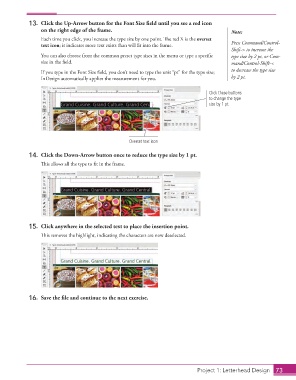
13.  Click the Up-Arrow button for the Font Size field until you see a red icon
                      on the right edge of the frame.                                          Note:
                      Each time you click, you increase the type size by one point. The red X is the overset
                      text icon; it indicates more text exists than will fit into the frame.   Press Command/Control-
                                                                                               Shift-> to increase the
                      You can also choose from the common preset type sizes in the menu or type a specific   type size by 2 pt, or Com-
                      size in the field.                                                       mand/Control-Shift-<

                      If you type in the Font Size field, you don’t need to type the unit “pt” for the type size;   to decrease the type size
                      InDesign automatically applies the measurement for you.                  by 2 pt.


                                                                                      Click these buttons
                                                                                      to change the type
                                                                                      size by 1 pt.


                                                        Overset text icon


                  14.  Click the Down-Arrow button once to reduce the type size by 1 pt.
                      This allows all the type to fit in the frame.


                  15.  Click anywhere in the selected text to place the insertion point.

                      This removes the highlight, indicating the characters are now deselected.


                  16.  Save the file and continue to the next exercise.


                                                                                  Project 1: Letterhead Design  73

