


Page 65 - CC 2019 ID Look Inside
P. 65
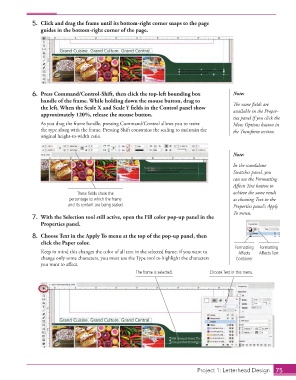
5.  Click and drag the frame until its bottom-right corner snaps to the page
                      guides in the bottom-right corner of the page.


                  6.  Press Command/Control-Shift, then click the top-left bounding box         Note:
                      handle of the frame. While holding down the mouse button, drag to         Th  e same fi elds are
                      the left. When the Scale X and Scale Y fi elds in the Control panel show   available in the  Proper-
                      approximately 120%, release the mouse button.
                                                                                                ties panel if you click the
                      As you drag the frame handle, pressing Command/Control allows you to resize   More Options button in
                      the type along with the frame. Pressing Shift constrains the scaling to maintain the   the Transform section.
                      original height-to-width ratio.


                                                                                                Note:
                                                                                                In the standalone
                                                                                                Swatches panel, you
                                                                                                can use the  Formatting
                                                                                                Aff ects Text button to
                                    These fields show the                                       achieve the same result
                                 percentage to which the frame                                  as choosing Text in the
                                 and its content are being scaled.                                Properties panel’s Apply
                                                                                                To menu.
                  7.  With the Selection tool still active, open the Fill color pop-up panel in the
                      Properties panel.

                  8.  Choose Text in the Apply To menu at the top of the pop-up panel, then
                      click the Paper  color.
                                                                                                Formatting   Formatting
                      Keep in mind this changes the color of all text in the selected frame; if you want to   Affects   Affects Text
                      change only some characters, you must use the Type tool to highlight the characters   Container
                      you want to aff ect.
                                                          The frame is selected.       Choose Text in this menu.


                                                                                    Project 1: Letterhead Design  75

