


Page 51 - CC 2019 ID Look Inside
P. 51
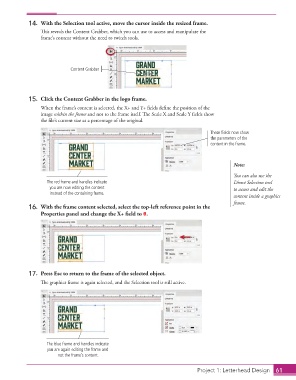
14.  With the Selection tool active, move the cursor inside the resized frame.
                      Th  is reveals the  Content Grabber, which you can use to access and manipulate the
                      frame’s content without the need to switch tools.


                                 Content Grabber


                  15.  Click the  Content Grabber in the logo frame.
                      When the frame’s content is selected, the X+ and Y+ fi elds defi ne the position of the
                      image within the frame and not to the frame itself. Th  e Scale X and Scale Y fi elds show
                      the fi le’s current size as a percentage of the original.

                                                                                       These fields now show
                                                                                       the parameters of the
                                                                                       content in the frame.


                                                                                                Note:
                                                                                                You can also use the
                        The red frame and handles indicate                                      Direct Selection tool
                         you are now editing the content                                        to access and edit the
                         instead of the containing frame.
                                                                                                content inside a graphics
                                                                                                frame.
                  16.  With the frame content selected, select the top-left reference point in the
                      Properties panel and change the X+ fi eld to 0.


                  17.  Press Esc to return to the frame of the selected object.
                      Th  e graphics frame is again selected, and the  Selection tool is still active.


                        The blue frame and handles indicate
                        you are again editing the frame and
                             not the frame’s content.


                                                                                    Project 1: Letterhead Design  61

