


Page 49 - CC 2019 ID Look Inside
P. 49
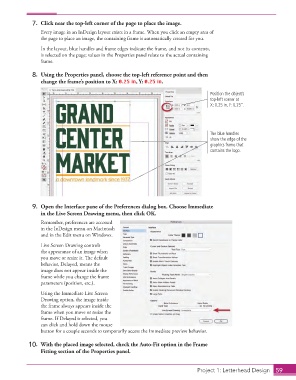
7.  Click near the top-left corner of the page to place the image.
                      Every image in an InDesign layout exists in a frame. When you click an empty area of
                      the page to place an image, the containing frame is automatically created for you.
                      In the layout, blue handles and frame edges indicate the frame, and not its contents,
                      is selected on the page; values in the  Properties panel relate to the actual containing
                      frame.

                  8.  Using the  Properties panel, choose the top-left reference point and then
                      change the frame’s position to X: 0.25 in, Y: 0.25 in.

                                                                                       Position the object’s
                                                                                       top-left corner at
                                                                                       X: 0.25 in, Y: 0.25”.


                                                                                       The blue handles
                                                                                       show the edge of the
                                                                                       graphics frame that
                                                                                       contains the logo.


                  9.  Open the  Interface pane of the Preferences dialog box. Choose Immediate
                      in the  Live Screen Drawing menu, then click OK.
                      Remember, preferences are accessed
                      in the InDesign menu on Macintosh
                      and in the Edit menu on Windows.
                      Live Screen Drawing controls
                      the appearance of an image when
                      you move or resize it. Th  e default
                      behavior, Delayed, means the
                      image does not appear inside the
                      frame while you change the frame
                      parameters (position, etc.).

                      Using the Immediate Live Screen
                      Drawing option, the image inside
                      the frame always appears inside the
                      frame when you move or resize the
                      frame. If Delayed is selected, you
                      can click and hold down the mouse
                      button for a couple seconds to temporarily access the Immediate preview behavior.

                  10.  With the placed image selected, check the  Auto-Fit option in the Frame
                      Fitting section of the  Properties panel.


                                                                                    Project 1: Letterhead Design  59

