


Page 43 - CC 2019 ID Look Inside
P. 43
Create a Rounded Rectangle

                 In addition to basic rectangles, you can create frames with a number of special corner
                 treatments. In this exercise, you modify one corner of the right-most graphics frame
                 to smoothly blend with the curve of the underlying background shape.

                  1. With gcm-letterhead.indd open, make sure nothing is selected in the layout.

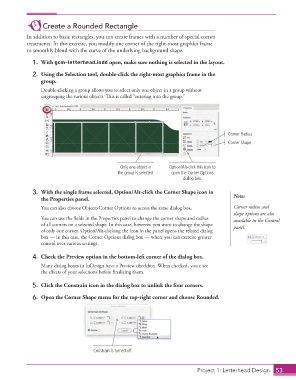
                  2.  Using the Selection tool, double-click the right-most graphics frame in the
                      group.
                      Double-clicking a  group allows you to select only one object in a group without
                      ungrouping the various objects. Th  is is called “entering into the group.”


                                                                                              Corner Radius
                                                                                              Corner Shape


                                                    Only one object in   Option/Alt-click this icon to
                                                   the group is selected.  open the Corner Options
                                                                            dialog box.

                  3.  With the single frame selected, Option/Alt-click the Corner Shape icon in   Note:
                      the  Properties panel.
                      You can also choose Object>Corner Options to access the same dialog box.  Corner radius and
                                                                                                shape options are also
                      You can use the fi elds in the  Properties panel to change the  corner shape and radius   available in the Control
                      of all corners on a selected shape. In this case, however, you want to change the shape   panel.
                      of only one corner. Option/Alt-clicking the icon in the panel opens the related dialog
                      box — in this case, the Corner Options dialog box — where you can exercise greater
                      control over various settings.

                  4.  Check the Preview option in the bottom-left corner of the dialog box.
                      Many dialog boxes in InDesign have a Preview checkbox. When checked, you c see
                      the eff ects of your selections before fi nalizing them.

                  5.  Click the Constrain icon in the dialog box to unlink the four corners.

                  6.  Open the Corner Shape menu for the top-right corner and choose Rounded.


                                          Constrain is turned off.


                                                                                    Project 1: Letterhead Design  53

