


Page 44 - CC2018_AI_Look_Inside
P. 44
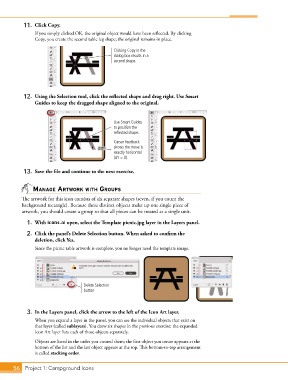
11.  Click Copy.
               If you simply clicked OK, the original object would have been reflected. By clicking
               Copy, you create the second table leg shape; the original remains in place.

                                                Clicking Copy in the
                                                dialog box results in a
                                                second shape.


           12.  Using the Selection tool, click the reflected shape and drag right. Use Smart
               Guides to keep the dragged shape aligned to the original.


                                                Use Smart Guides
                                                to position the
                                                reflected shape.
                                                Cursor feedback
                                                shows the move is
                                                exactly horizontal
                                                (dY = 0).

           13.  Save the file and continue to the next exercise.


               managE artWork WIth groups
          The artwork for this icon consists of six separate shapes (seven, if you count the
          background rectangle). Because these distinct objects make up one single piece of
          artwork, you should create a group so that all pieces can be treated as a single unit.
            1.  With icons.ai open, select the Template picnic.jpg layer in the Layers panel.

            2.  Click the panel’s Delete Selection button. When asked to confirm the
               deletion, click Yes.
               Since the picnic table artwork is complete, you no longer need the template image.


                                    Delete Selection
                                    button


            3.  In the Layers panel, click the arrow to the left of the Icon Art layer.
               When you expand a layer in the panel, you can see the individual objects that exist on
               that layer (called sublayers). You drew six shapes in the previous exercise; the expanded
               Icon Art layer lists each of those objects separately.
               Objects are listed in the order you created them; the first object you create appears at the
               bottom of the list and the last object appears at the top. This bottom-to-top arrangement
               is called stacking order.


       56 Project 1: Campground Icons

