


Page 49 - CC2018_AI_Look_Inside
P. 49
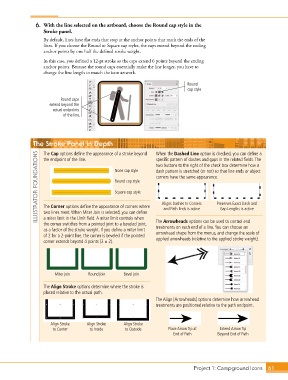
6.  With the line selected on the artboard, choose the Round cap style in the
                   Stroke panel.

                   By default, lines have flat ends that stop at the anchor points that mark the ends of the
                   lines. If you choose the Round or Square cap styles, the caps extend beyond the ending
                   anchor points by one half the defined stroke weight.

                   In this case, you defined a 12-pt stroke so the caps extend 6 points beyond the ending
                   anchor points. Because the round caps essentially make the line longer, you have to
                   change the line length to match the icon artwork.

                                                                              Round
                                                                              cap style

                          Round caps
                     extend beyond the
                       actual endpoints
                           of the line.


               The Stroke Panel in Depth                         When the Dashed Line option is checked, you can define a

                   The Cap options define the appearance of a stroke beyond
                ILLUSTRATOR FOUNDATIONS         None cap style   dash pattern is stretched (or not) so that line ends or object
                                                                 specific pattern of dashes and gaps in the related fields. The
                   the endpoint of the line.
                                                                 two buttons to the right of the check box determine how a
                                                                 corners have the same appearance.
                                                Round cap style

                                                Square cap style

                                                                    Aligns Dashes to Corners
                                                                                          Preserves Exact Dash and
                   The Corner options define the appearance of corners where
                                                                    and Path Ends is active
                                                                                            Gap Lengths is active
                   two lines meet. When Miter Join is selected, you can define
                   a miter limit in the Limit field. A miter limit controls when
                   the corner switches from a pointed joint to a beveled joint,   The Arrowheads options can be used to control end
                                                                 treatments on each end of a line. You can choose an
                   as a factor of the stroke weight. If you define a miter limit   arrowhead shape from the menus, and change the scale of
                   of 2 for a 2-point line, the corner is beveled if the pointed   applied arrowheads (relative to the applied stroke weight).
                   corner extends beyond 4 points (2 1 2).


                        Miter join   Round join     Bevel join

                   The Align Stroke options determine where the stroke is
                   placed relative to the actual path.
                                                                 The Align [Arrowheads] options determine how arrowhead
                                                                 treatments are positioned relative to the path endpoint.


                      Align Stroke   Align Stroke   Align Stroke
                       to Center      to Inside      to Outside       Place Arrow Tip at    Extend Arrow Tip
                                                                         End of Path       Beyond End of Path


                                                                                 Project 1: Campground Icons    61

