


Page 47 - CC2018_AI_Look_Inside
P. 47
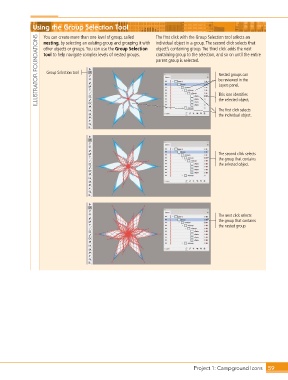
Using the Group Selection Tool                    The first click with the Group Selection tool selects an

                   You can create more than one level of group, called
                ILLUSTRATOR FOUNDATIONS  tool to help navigate complex levels of nested groups.   containing group to the selection, and so on until the entire
                   nesting, by selecting an existing group and grouping it with  individual object in a group. The second click selects that
                   other objects or groups. You can use the Group Selection
                                                                 object’s containing group. The third click adds the next
                                                                 parent group is selected.

                    Group Selection tool
                                                                                           Nested groups can
                                                                                           be reviewed in the
                                                                                           Layers panel.

                                                                                           This icon identifies
                                                                                           the selected object.

                                                                                           The first click selects
                                                                                           the individual object.


                                                                                           The second click selects
                                                                                           the group that contains
                                                                                           the selected object.


                                                                                           The next click selects
                                                                                           the group that contains
                                                                                           the nested group.


                                                                                 Project 1: Campground Icons    59

