


Page 35 - CC2018_AI_Look_Inside
P. 35
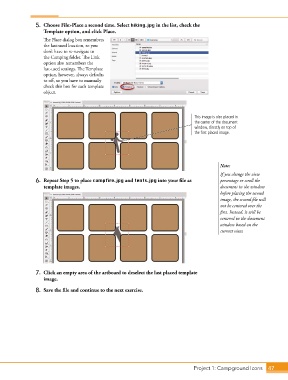
5.  Choose File>Place a second time. Select hiking.jpg in the list, check the
                   Template option, and click Place.

                   The Place dialog box remembers
                   the last-used location, so you
                   don’t have to re-navigate to
                   the Camping folder. The Link
                   option also remembers the
                   last-used settings. The Template
                   option, however, always defaults
                   to off, so you have to manually
                   check this box for each template
                   object.


                                                                                 This image is also placed in
                                                                                 the center of the document
                                                                                 window, directly on top of
                                                                                 the first placed image.


                                                                                            Note:
                                                                                            If you change the view
                6.  Repeat Step 5 to place campfire.jpg and tents.jpg into your file as     percentage or scroll the
                   template images.                                                         document in the window
                                                                                            before placing the second
                                                                                            image, the second file will
                                                                                            not be centered over the
                                                                                            first. Instead, it will be
                                                                                            centered in the document
                                                                                            window based on the
                                                                                            current view.


                7.  Click an empty area of the artboard to deselect the last placed template
                   image.

                8.  Save the file and continue to the next exercise.


                                                                                 Project 1: Campground Icons    47

