


Page 34 - CC2018_AI_Look_Inside
P. 34
Import tEmplatE ImagEs
          Many Illustrator projects require you to start with something that has already been
          captured — a sketch, photograph, or low-resolution image (which is the case in this
          project). In this exercise you will place existing digital files to use as templates for your
          new artwork.
            1.  With icons.ai open, choose File>Place. Navigate to your WIP>Camping
               folder and click picnic.jpg to select that file.

            2.  Macintosh users: If you don’t see a series of check boxes across the bottom of
               the dialog box, click the Options button.
               The dialog box button remembers the last-used state, so the actual options might already
               be visible. We do not repeat the instruction to click the Options button whenever you
               place a file throughout the projects in this book.

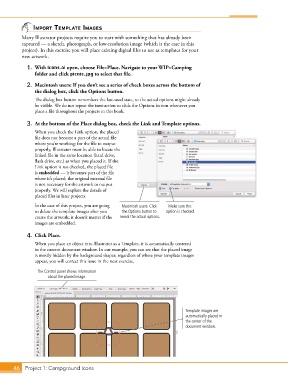
            3.  At the bottom of the Place dialog box, check the Link and Template options.
               When you check the Link option, the placed
               file does not become a part of the actual file
               where you’re working; for the file to output
               properly, Illustrator must be able to locate the
               linked file in the same location (hard drive,
               flash drive, etc.) as when you placed it. If the
               Link option is not checked, the placed file
               is embedded — it becomes part of the file
               where it’s placed; the original external file
               is not necessary for the artwork to output
               properly. We will explore the details of
               placed files in later projects.
               In the case of this project, you are going   Macintosh users: Click   Make sure this
               to delete the template images after you   the Options button to   option is checked.
               create the artwork; it doesn’t matter if the   reveal the actual options.
               images are embedded.

            4.  Click Place.
               When you place an object into Illustrator as a Template, it is automatically centered
               in the current document window. In our example, you can see that the placed image
               is mostly hidden by the background shapes; regardless of where your template images
               appear, you will correct this issue in the next exercise.

                 The Control panel shows information
                     about the placed image.


                                                                              Template images are
                                                                              automatically placed in
                                                                              the center of the
                                                                              document window.


       46 Project 1: Campground Icons

