


Page 30 - CS6_DW_Look_Inside
P. 30
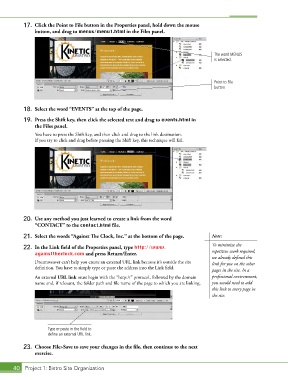
17.  Click the Point to File button in the Properties panel, hold down the mouse
               button, and drag to menus/menu1.html in the Files panel.


                                                                                         The word MENUS
                                                                                         is selected.


                                                                                         Point to File
                                                                                         button


           18.  Select the word “EVENTS” at the top of the page.

           19.  Press the Shift key, then click the selected text and drag to events.html in
               the Files panel.
               You have to press the Shift key, and then click and drag to the link destination.
               If you try to click and drag before pressing the Shift key, this technique will fail.


           20.  Use any method you just learned to create a link from the word
               “CONTACT” to the contact.html file.

           21.  Select the words “Against The Clock, Inc.” at the bottom of the page.   Note:
                                                                                        To minimize the
           22.  In the Link field of the Properties panel, type http://www.             repetitive work required,
               againsttheclock.com and press Return/Enter.
                                                                                        we already defined this
               Dreamweaver can’t help you create an external URL link because it’s outside the site   link for you on the other
               definition. You have to simply type or paste the address into the Link field.  pages in the site. In a

               An external URL link must begin with the “http://” protocol, followed by the domain   professional environment,
               name and, if relevant, the folder path and file name of the page to which you are linking.   you would need to add
                                                                                        this link to every page in
                                                                                        the site.


                     Type or paste in the field to
                     define an external URL link.

           23.  Choose File>Save to save your changes in the file, then continue to the next
               exercise.


       40 Project 1: Bistro Site Organization

