


Page 32 - CS6_DW_Look_Inside
P. 32
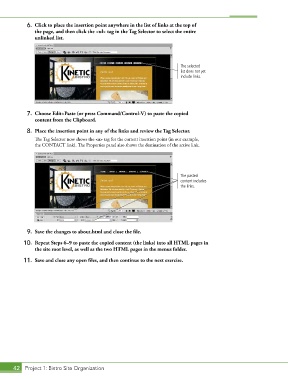
6.  Click to place the insertion point anywhere in the list of links at the top of
               the page, and then click the <ul> tag in the Tag Selector to select the entire
               unlinked list.


                                                                            The selected
                                                                            list does not yet
                                                                            include links.


            7.  Choose Edit>Paste (or press Command/Control-V) to paste the copied
               content from the Clipboard.

            8.  Place the insertion point in any of the links and review the Tag Selector.
               The Tag Selector now shows the <a> tag for the current insertion point (in our example,
               the CONTACT link). The Properties panel also shows the destination of the active link.


                                                                            The pasted
                                                                            content includes
                                                                            the links.


            9.  Save the changes to about.html and close the file.

           10.  Repeat Steps 6–9 to paste the copied content (the links) into all HTML pages in
               the site root level, as well as the two HTML pages in the menus folder.

           11.  Save and close any open files, and then continue to the next exercise.


       42 Project 1: Bistro Site Organization

