


Page 27 - CS6_DW_Look_Inside
P. 27
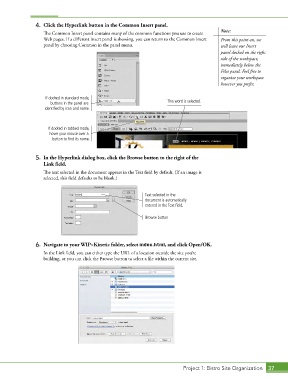
4.  Click the Hyperlink button in the Common Insert panel.
                   The Common Insert panel contains many of the common functions you use to create   Note:
                   Web pages. If a different Insert panel is showing, you can return to the Common Insert   From this point on, we
                   panel by choosing Common in the panel menu.                              will leave our Insert
                                                                                            panel docked on the right
                                                                                            side of the workspace,
                                                                                            immediately below the
                                                                                            Files panel. Feel free to
                                                                                            organize your workspace
                                                                                            however you prefer.

                    If docked in standard mode,
                      buttons in the panel are                        This word is selected.
                   identified by icon and name.


                     If docked in tabbed mode,
                     hover your mouse over a
                       button to find its name.


                5.  In the Hyperlink dialog box, click the Browse button to the right of the
                   Link field.

                   The text selected in the document appears in the Text field by default. (If an image is
                   selected, this field defaults to be blank.)


                                                             Text selected in the
                                                             document is automatically
                                                             entered in the Text field.

                                                             Browse button


                6.  Navigate to your WIP>Kinetic folder, select index.html, and click Open/OK.
                   In the Link field, you can either type the URL of a location outside the site you’re
                   building, or you can click the Browse button to select a file within the current site.


                                                                             Project 1: Bistro Site Organization  37

