


Page 28 - CS6_DW_Look_Inside
P. 28
7.  Open the Target menu and choose _self.
               This option determines where the linked file will open:
                                                                                        Note:
                  •  _blank opens every linked file in a new, unnamed browser window.
                                                                                        You can change the
                  •   new creates a new browser window with the name “_new”. Every link assigned   destination of a link
                     the _new target will open in that same _new browser window.        by selecting the linked
                  •  _ parent is relevant if a page includes nested frames; this option opens the link in   text or object in the
                      the frame or window that contains the frame with the link.        document and choosing
                  •  _self opens the link in the same frame or browser window as the link. This is the   Modify>Change Link.
                     default behavior if you do not choose an option in the Target menu.  This menu command
                  •  _top opens the link in the same browser window, regardless of frames.  opens the same dialog
                                                                                        box as the Browse for File
            8.  In the Title field, type Kinetic Bistro home page.                      button, where you can
               The Title field defines text that appears when the cursor is placed over the link text.   navigate to and select the
               Defining a descriptive title for links can help a page achieve better search engine results.  new link destination.


                                                                                        Note:
                                                                                        You can use the Access
                                                                                        Key field to define a
                                                                                        keyboard shortcut for the
                                                                                        link, and use the Tab
                                                                                        Index field to specify the
                                                                                        number of times a user
            9.  Click OK in the Hyperlink dialog box to create the link.                needs to press the Tab key
                                                                                        to select the link.
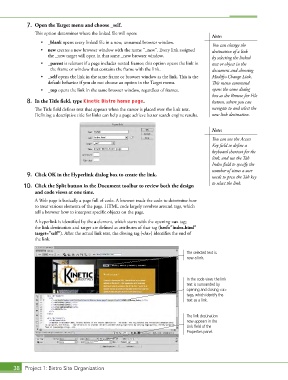
           10.  Click the Split button in the Document toolbar to review both the design
               and code views at one time.
               A Web page is basically a page full of code. A browser reads the code to determine how
               to treat various elements of the page. HTML code largely revolves around tags, which
               tell a browser how to interpret specific objects on the page.
               A hyperlink is identified by the a element, which starts with the opening <a> tag;
               the link destination and target are defined as attributes of that tag (href="index.html"
               target="self"). After the actual link text, the closing tag (</a>) identifies the end of
               the link.

                                                                              The selected text is
                                                                              now a link.


                                                                              In the code view, the link
                                                                              text is surrounded by
                                                                              opening and closing <a>
                                                                              tags, which identify the
                                                                              text as a link.


                                                                              The link destination
                                                                              now appears in the
                                                                              Link field of the
                                                                              Properties panel.


       38 Project 1: Bistro Site Organization

