


Page 25 - CS6_DW_Look_Inside
P. 25
CreAte hYPerlinks within the site
              Dreamweaver offers a number of options for creating the necessary links for any Web
              site structure.

                 •  Hyperlink Button in the Common Insert Panel. Clicking the Hyperlink
                    button in the Common Insert panel opens the Hyperlink dialog box, where
                    you define the specific parameters of the link.                         Note:

                 •  Insert>Hyperlink menu. This menu command opens the same dialog box      Dreamweaver often
                    that you see when you click the Hyperlink button in the Insert panel.   includes several different
                                                                                            ways to achieve the same
                 •  Properties Panel Fields. You can also simply define the specifics of a hyperlink   result. You should use
                    in the Properties panel. This method offers the same options as those in the   the method that is most
                    Hyperlink dialog box, but does not require the dialog box interface.    efficient at the time.
                 •  Point to File button in the Properties panel. To create a link using this
                    method, simply click the Point to File button, hold down the mouse button,
                    and drag to a file in the Files panel; Dreamweaver automatically creates a link.
                 •  Browse for File button in the Properties panel. The Browse for File button
                    opens a navigation dialog box, where you can select the file that will open
                    when a user clicks on the link.

                 •  Shift-Drag Method. You can create a link directly from the document window
                    by pressing Shift and then clicking and dragging from the link source to the
                    destination page in the Files panel. (This method only works for text; you can’t
                    Shift-drag to create a link for an image.)

                1.  With the Kinetic site open in the Files panel, open index.html.
                2.  At the top of the page, double-click the word “HOME” to select it.

                3.  If your Insert panel is docked above the document window, click the Common tab
                   at the top of the panel.

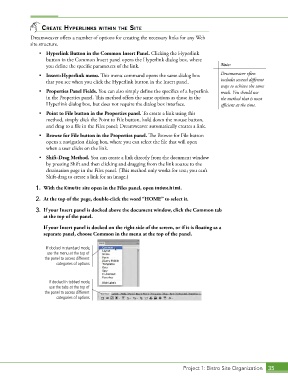
                    If your Insert panel is docked on the right side of the screen, or if it is floating as a
                   separate panel, choose Common in the menu at the top of the panel.


                    If docked in standard mode,
                    use the menu at the top of
                   the panel to access different
                        categories of options.


                     If docked in tabbed mode,
                     use the tabs at the top of
                   the panel to access different
                        categories of options.


                                                                             Project 1: Bistro Site Organization  35

