


Page 34 - CS6_DW_Look_Inside
P. 34
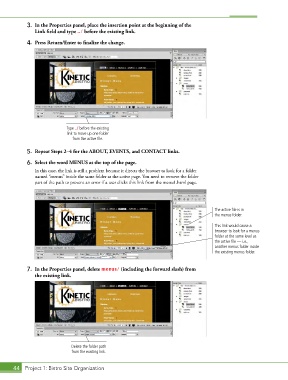
3.  In the Properties panel, place the insertion point at the beginning of the
               Link field and type ../ before the existing link.

            4.  Press Return/Enter to finalize the change.


                             Type ../ before the existing
                             link to move up one folder
                               from the active file.

            5.  Repeat Steps 2–4 for the ABOUT, EVENTS, and CONTACT links.

            6.  Select the word MENUS at the top of the page.
               In this case, the link is still a problem because it directs the browser to look for a folder
               named “menus” inside the same folder as the active page. You need to remove the folder
               part of the path to prevent an error if a user clicks this link from the menu1.html page.


                                                                                          The active file is in
                                                                                          the menus folder.

                                                                                          This link would cause a
                                                                                          browser to look for a menus
                                                                                          folder at the same level as
                                                                                          the active file — i.e.,
                                                                                          another menus folder inside
                                                                                          the existing menus folder.


            7.  In the Properties panel, delete menus/ (including the forward slash) from
               the existing link.


                               Delete the folder path
                               from the existing link.


       44 Project 1: Bistro Site Organization

