


Page 33 - CS6_DW_Look_Inside
P. 33
Adjust relAtive link PAths
              A path is the route taken through the folder structure to link one page to another. By
              default, Dreamweaver uses relative paths when creating links (the application refers to
              this as “relative to the document”). The alternative is to create absolute paths (“relative
              to the site”); but unless your site is running on a Web server, you can’t test links that
              use absolute paths.
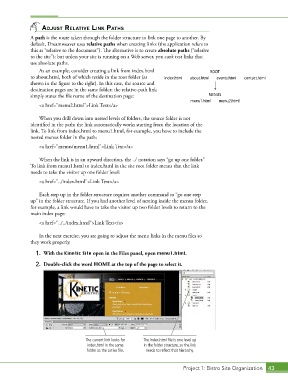
                 As an example, consider creating a link from index.html                ROOT
              to about.html, both of which reside in the root folder (as   index.html         about.html         events.html         contact.html
              shown in the figure to the right). In this case, the source and
              destination pages are in the same folder; the relative-path link
              simply states the file name of the destination page:                     MENUS
                                                                                menu1.html         menu2.html
                 <a href="menu2.html">Link Text</a>


                 When you drill down into nested levels of folders, the source folder is not
              identified in the path; the link automatically works starting from the location of the
              link. To link from index.html to menu1.html, for example, you have to include the
              nested menus folder in the path:

                 <a href="menus/menu1.html">Link Text</a>

                 When the link is in an upward direction, the ../ notation says “go up one folder.”
              To link from menu1.html to index.html in the site root folder means that the link
              needs to take the visitor up one folder level:
                 <a href="../index.html">Link Text</a>

                 Each step up in the folder structure requires another command to “go one step
              up” in the folder structure. If you had another level of nesting inside the menus folder,
              for example, a link would have to take the visitor up two folder levels to return to the
              main index page:
                 <a href="../../index.html">Link Text</a>


                 In the next exercise, you are going to adjust the menu links in the menu files so
              they work properly.
                1.  With the Kinetic Site open in the Files panel, open menu1.html.

                2.  Double-click the word HOME at the top of the page to select it.


                                    The current link looks for   The index.html file is one level up
                                     index.html in the same   in the folder structure, so the link
                                     folder as the active file.  needs to reflect that hierarchy.


                                                                             Project 1: Bistro Site Organization  43

