


Page 24 - CS6_DW_Look_Inside
P. 24
Stage 2	 Organizing	the	Site	Navigation

          Hyperlinks (the official term for links) can be created to link pages on a site to other pages within the
          same site, or to pages on other sites. A well-designed site includes links that make it easy to get to any
          part of a site from any other part of a site. You should carefully plan the flow of links and connections
          between pages — always keeping the reader’s usability in mind.
              Organizing links is a simple application of a science called information architecture, which is
          the organization of a Web site to support both usability and “findability.” As you organize site links,
          remember that your goal is to enable visitors to see a pattern in your links, which will assist them in
          navigating through your site. Keep the following points in mind when you plan a site’s link structure:

              •  You can’t know how visitors will enter your site. The primary site pages (home, about us, etc.)
                should be accessible from every page on the site.
              •  When linking secondary pages such as different menus for different mealtimes, don’t make
                users constantly click the browser’s Back button. Links should allow users to navigate all
                sibling pages (at the same level) as easily as navigating the primary structure. For example,
                users should be able to access the dinner menu or lunch menu in the restaurant’s site without
                first going back to a main “Menu” page.

              Using the terms “parent,” “child,” and “sibling” is simply a way of describing relationships between
          pages. A large Web site cannot provide links to all of the pages from its home page. By grouping
          pages, grouping groups of pages, and so on, you create relationships of equality between pages that are
          grouped together, as well as between groups that are
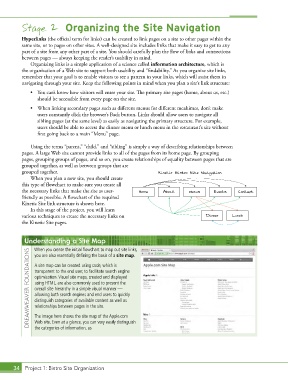
          grouped together.                                       Kinetic Bistro Site Navigation
              When you plan a new site, you should create
          this type of flowchart to make sure you create all
          the necessary links that make the site as user-  Home     About      Menus     Events    Contact
          friendly as possible. A flowchart of the required
          Kinetic Site link structure is shown here.
              In this stage of the project, you will learn
          various techniques to create the necessary links on                         Dinner     Lunch
          the Kinetic Site pages.


           Understanding a Site Map

               When you create the initial flowchart to map out site links,
             DREAMWEAVER FOUNDATIONS  A site map can be created using code, which is
               you are also essentially defining the basis of a site map.

               transparent to the end user, to facilitate search engine
               optimization. Visual site maps, created and displayed
               using HTML, are also commonly used to present the
               overall site hierarchy in a simple visual manner —
               allowing both search engines and end users to quickly
               distinguish categories of available content as well as
               relationships between pages in the site.

               The image here shows the site map of the Apple.com
               Web site. Even at a glance, you can very easily distinguish
               the categories of information, as


       34 Project 1: Bistro Site Organization

