


Page 65 - CC2017_WD_Look_Inside
P. 65
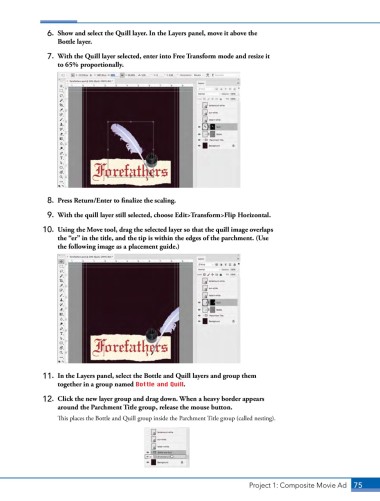
6.  Show and select the Quill layer. In the Layers panel, move it above the
                   Bottle layer.

                7.  With the Quill layer selected, enter into Free Transform mode and resize it
                   to 65% proportionally.


                8.  Press Return/Enter to finalize the scaling.

                9.  With the quill layer still selected, choose Edit>Transform>Flip Horizontal.

               10.  Using the Move tool, drag the selected layer so that the quill image overlaps
                   the “er” in the title, and the tip is within the edges of the parchment. (Use
                   the following image as a placement guide.)


               11.  In the Layers panel, select the Bottle and Quill layers and group them
                   together in a group named Bottle and Quill.

               12.  Click the new layer group and drag down. When a heavy border appears
                   around the Parchment Title group, release the mouse button.
                   This places the Bottle and Quill group inside the Parchment Title group (called nesting).


                                                                               Project 1: Composite Movie Ad    75

