


Page 64 - CC2017_WD_Look_Inside
P. 64
CreAte A nested group

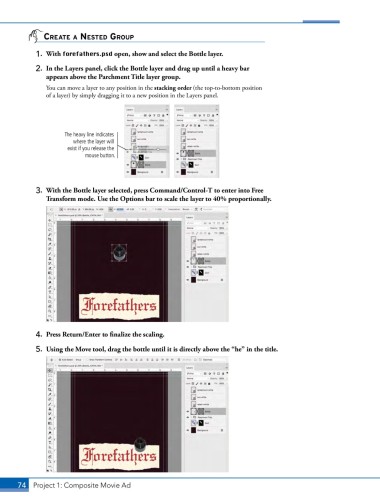
            1.  With forefathers.psd open, show and select the Bottle layer.
            2.  In the Layers panel, click the Bottle layer and drag up until a heavy bar
               appears above the Parchment Title layer group.
               You can move a layer to any position in the stacking order (the top-to-bottom position
               of a layer) by simply dragging it to a new position in the Layers panel.


                     The heavy line indicates
                        where the layer will
                      exist if you release the
                            mouse button.


            3.  With the Bottle layer selected, press Command/Control-T to enter into Free
               Transform mode. Use the Options bar to scale the layer to 40% proportionally.


            4.  Press Return/Enter to finalize the scaling.

            5.  Using the Move tool, drag the bottle until it is directly above the “he” in the title.


       74 Project 1: Composite Movie Ad

