


Page 69 - CC2017_WD_Look_Inside
P. 69
sAve A jpeg file for digitAl mediA
              Your client has also requested a low-resolution JPEG file using the RGB color model.
              Several extra steps are required to create this file with the required settings.

                1.  With forefathers.psd open in Photoshop, choose File>Save As.

                   To protect your work, you are saving this file with a different file name before making
                   significant destructive changes.

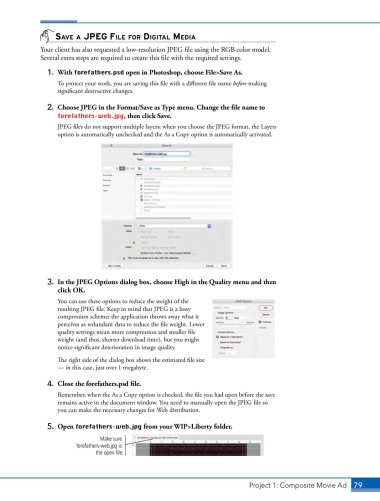
                2.  Choose JPEG in the Format/Save as Type menu. Change the file name to
                   forefathers-web.jpg, then click Save.
                   JPEG files do not support multiple layers; when you choose the JPEG format, the Layers
                   option is automatically unchecked and the As a Copy option is automatically activated.


                3.  In the JPEG Options dialog box, choose High in the Quality menu and then
                   click OK.
                   You can use these options to reduce the weight of the
                   resulting JPEG file. Keep in mind that JPEG is a lossy
                   compression scheme; the application throws away what it
                   perceives as redundant data to reduce the file weight. Lower
                   quality settings mean more compression and smaller file
                   weight (and thus, shorter download time), but you might
                   notice significant deterioration in image quality.

                   The right side of the dialog box shows the estimated file size
                   — in this case, just over 1 megabyte.

                4.  Close the forefathers.psd file.
                   Remember, when the As a Copy option is checked, the file you had open before the save
                   remains active in the document window. You need to manually open the JPEG file so
                   you can make the necessary changes for Web distribution.

                5.  Open forefathers-web.jpg from your WIP>Liberty folder.

                                Make sure
                         forefathers-web.jpg is
                               the open file.


                                                                               Project 1: Composite Movie Ad    79

