


Page 59 - CC2017_WD_Look_Inside
P. 59
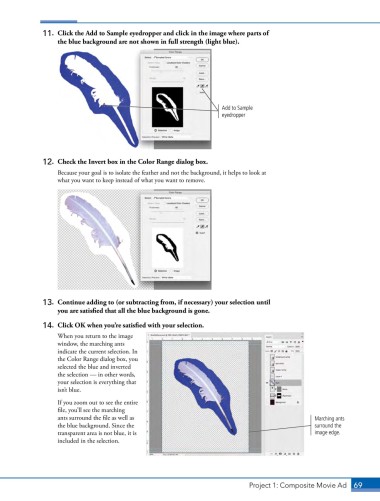
11.  Click the Add to Sample eyedropper and click in the image where parts of
                   the blue background are not shown in full strength (light blue).


                                                                      Add to Sample
                                                                      eyedropper


               12.  Check the Invert box in the Color Range dialog box.
                   Because your goal is to isolate the feather and not the background, it helps to look at
                   what you want to keep instead of what you want to remove.


               13.  Continue adding to (or subtracting from, if necessary) your selection until
                   you are satisfied that all the blue background is gone.

               14.  Click OK when you’re satisfied with your selection.
                   When you return to the image
                   window, the marching ants
                   indicate the current selection. In
                   the Color Range dialog box, you
                   selected the blue and inverted
                   the selection — in other words,
                   your selection is everything that
                   isn’t blue.

                   If you zoom out to see the entire
                   file, you’ll see the marching
                   ants surround the file as well as                                               Marching ants
                   the blue background. Since the                                                  surround the
                   transparent area is not blue, it is                                             image edge.
                   included in the selection.


                                                                               Project 1: Composite Movie Ad    69

