


Page 72 - Adobe Photoshop and Dreamviewer 2021
P. 72
8.  Experiment with the adjustments in the Properties panel until you’re     Note:
               satisfied with the selection edge.
                                                                                        It might help to work
               You want to include a small amount of darkness around the edge so that when you
               invert the selection to remove the hole in the wall, there is no light halo effect left by   with a closer view while
               the selection edge. We used the Shift Edge slider to slightly expand the selection edge.  you refine edges. You can
                                                                                        use the Zoom and Hand
                 Refine Mode options:                                                   tools to change the im-
                 •  Color Aware mode, the default option, is best suited for selections with high-  age preview.
                    contrast edges, or on simple backgrounds without much detail.
                 •  Object Aware mode is betters suited for selecting fine detail such as hair on
                    complex backgrounds.
                 Edge Detection options:
                 •  Radius is the number of pixels around the edge that are affected. Higher radius
                    values result in softer edges and lower values result in sharper edges.
                 •  Smart Radius automatically adjusts the radius for hard and soft edges found in
                    the border region. You should turn off this option if your selection area has all
                    hard edges or all soft edges, or if you prefer to manually control the Radius.
                 Global Refinements options:
                 •  Smooth reduces the number of points that make up your selection and, as the
                    name suggests, makes a smoother edge. You can set smoothness from 0 (very
                    detailed selection) to 100 (very smooth selection).
                 •  Feather softens the selection edge, resulting in a transition that does not have
                    a hard edge (in other words, blends into the background). You can feather the
                    selection up to 250 pixels.
                 •  Contrast is the degree of variation allowed in the selection edge. Higher
                    Contrast values (up to 100%) mean sharper selection edges.
                 •  Shift Edge shrinks or grows the selection edge by the defined percentage
                    (from –100% to 100%).
                 •  Invert reverses the mask; selected areas become unselected and vice versa.


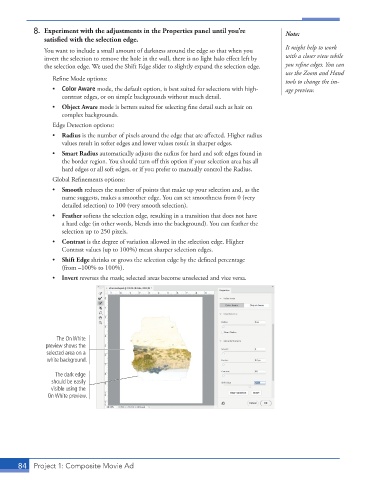
                  The On White
               preview shows the
               selected area on a
               white background.

                  The dark edge
                 should be easily
                 visible using the
                On White preview.


       84  Project 1: Composite Movie Ad

