


Page 77 - Adobe Photoshop and Dreamviewer 2021
P. 77
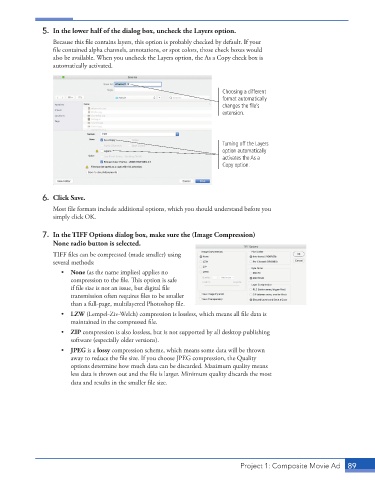
5.  In the lower half of the dialog box, uncheck the Layers option.
                 Because this file contains layers, this option is probably checked by default. If your
                 file contained alpha channels, annotations, or spot colors, those check boxes would
                 also be available. When you uncheck the Layers option, the As a Copy check box is
                 automatically activated.


                                                                     Choosing a different
                                                                     format automatically
                                                                     changes the file’s
                                                                     extension.


                                                                     Turning off the Layers
                                                                     option automatically
                                                                     activates the As a
                                                                     Copy option.


              6.  Click Save.
                 Most file formats include additional options, which you should understand before you
                 simply click OK.


              7.  In the TIFF Options dialog box, make sure the (Image Compression)
                 None radio button is selected.
                 TIFF files can be compressed (made smaller) using
                 several methods:
                    •  None (as the name implies) applies no
                       compression to the file. This option is safe
                       if file size is not an issue, but digital file
                       transmission often requires files to be smaller
                       than a full-page, multilayered Photoshop file.
                    •  LZW (Lempel-Ziv-Welch) compression is lossless, which means all file data is
                       maintained in the compressed file.
                    •  ZIP compression is also lossless, but is not supported by all desktop publishing
                       software (especially older versions).
                    •  JPEG is a lossy compression scheme, which means some data will be thrown
                       away to reduce the file size. If you choose JPEG compression, the Quality
                       options determine how much data can be discarded. Maximum quality means
                       less data is thrown out and the file is larger. Minimum quality discards the most
                       data and results in the smaller file size.


                                                                          Project 1: Composite Movie Ad    89

