


Page 69 - Adobe Photoshop and Dreamviewer 2021
P. 69
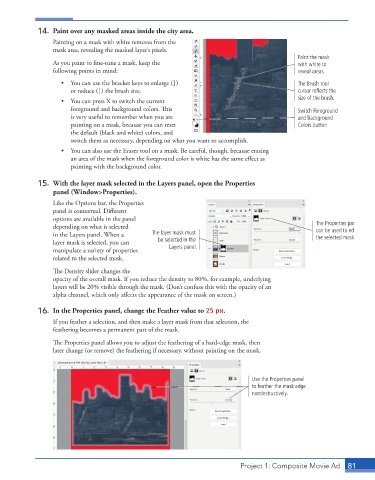
14.  Paint over any masked areas inside the city area.
                 Painting on a mask with white removes from the
                 mask area, revealing the masked layer’s pixels.
                                                                                            Paint the mask
                 As you paint to fine-tune a mask, keep the                                 with white to
                 following points in mind:                                                  reveal areas.
                    •  You can use the bracket keys to enlarge (])                          The Brush tool
                       or reduce ([) the brush size.                                        cursor reflects the
                    •  You can press X to switch the current                                size of the brush.
                       foreground and background colors. This                               Switch Foreground
                       is very useful to remember when you are                              and Background
                       painting on a mask, because you can reset                            Colors button
                       the default (black and white) colors, and
                       switch them as necessary, depending on what you want to accomplish.
                    •  You can also use the Eraser tool on a mask. Be careful, though, because erasing
                       an area of the mask when the foreground color is white has the same effect as
                       painting with the background color.

             15.  With the layer mask selected in the Layers panel, open the Properties
                 panel (Window>Properties).
                 Like the Options bar, the Properties
                 panel is contextual. Different
                 options are available in the panel
                 depending on what is selected                                                   The Properties panel
                 in the Layers panel. When a   The layer mask must                               can be used to edit
                                                                                                 the selected mask.
                 layer mask is selected, you can   be selected in the
                 manipulate a variety of properties   Layers panel.
                 related to the selected mask.

                 The Density slider changes the
                 opacity of the overall mask. If you reduce the density to 80%, for example, underlying
                 layers will be 20% visible through the mask. (Don’t confuse this with the opacity of an
                 alpha channel, which only affects the appearance of the mask on screen.)

             16.  In the Properties panel, change the Feather value to 25 px.
                 If you feather a selection, and then make a layer mask from that selection, the
                 feathering becomes a permanent part of the mask.
                 The Properties panel allows you to adjust the feathering of a hard-edge mask, then
                 later change (or remove) the feathering if necessary, without painting on the mask.


                                                                              Use the Properties panel
                                                                              to feather the mask edge
                                                                              nondestructively.


                                                                          Project 1: Composite Movie Ad    81

