


Page 70 - Adobe Photoshop and Dreamviewer 2021
P. 70
17.  Change the Feather value to 1 px.
               This small feathering value will help to remove (or, at least, minimize) any remaining

               background artifacts around the edges of your mask.


          18.  Save the fi le and continue to the next exercise.


               Make and Refi ne a Quick Selection

         As you learned, you can make selections based on the color in an image — useful
         when you want to select large areas of solid color, or in photos with significant con-

         trast between the foreground and background. When the area you want to select has
         a complex edge, refining that edge can produce very detailed results.

          1. With aftermath.psd open, hide all but the Bricks layer. Click the Bricks
               layer to select it as the active layer.

          2.  Choose the Quick Selection tool (nested under the Magic Wand tool).
          3.  In the Options bar, make sure the Sample All Layers option is not checked.

               You only want to select the area in the bricks layer (the hole in the wall), so you do not
               want to make a selection based on the content of other layers in the file.

                                                                                        Note:
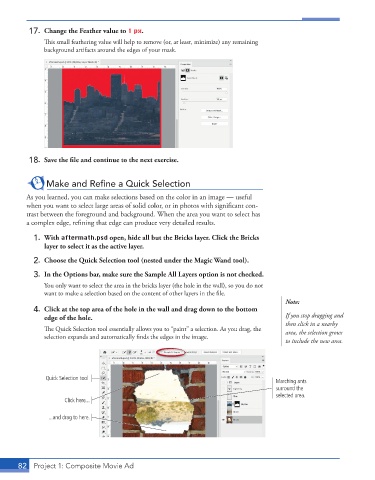
          4.  Click at the top area of the hole in the wall and drag down to the bottom
               edge of the hole.                                                        If you stop dragging and
                                                                                        then click in a nearby

               The Quick Selection tool essentially allows you to “paint” a selection. As you drag, the   area, the selection grows
               selection expands and automatically finds the edges in the image.

                                                                                        to include the new area.


               Quick Selection tool
                                                                                     Marching ants
                                                                                     surround the
                                                                                     selected area.
                     Click here...

                ...and drag to here.


       82  Project 1: Composite Movie Ad

