


Page 63 - Adobe Photoshop and Dreamviewer 2021
P. 63
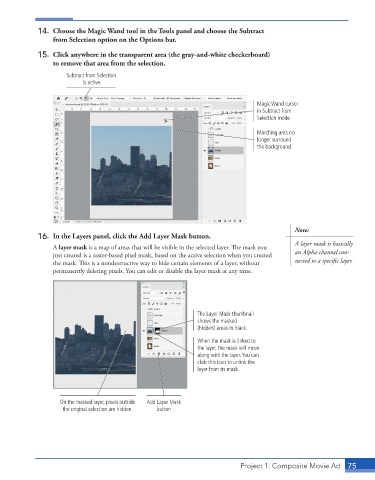
14.  Choose the Magic Wand tool in the Tools panel and choose the Subtract
                 from Selection option on the Options bar.

             15.  Click anywhere in the transparent area (the gray-and-white checkerboard)
                 to remove that area from the selection.

                     Subtract from Selection
                          is active.


                                                                               Magic Wand cursor
                                                                               in Subtract from
                                                                               Selection mode

                                                                               Marching ants no
                                                                               longer surround
                                                                               the background.


                                                                                           Note:
             16.  In the Layers panel, click the Add Layer Mask button.
                                                                                           A layer mask is basically
                 A layer mask is a map of areas that will be visible in the selected layer. The mask you
                 just created is a raster-based pixel mask, based on the active selection when you created   an Alpha channel con-
                 the mask. This is a nondestructive way to hide certain elements of a layer, without   nected to a specific layer.
                 permanently deleting pixels. You can edit or disable the layer mask at any time.


                                                             The Layer Mask thumbnail
                                                             shows the masked
                                                             (hidden) areas in black.
                                                             When the mask is linked to
                                                             the layer, the mask will move
                                                             along with the layer. You can
                                                             click this icon to unlink the
                                                             layer from its mask.


                   On the masked layer, pixels outside   Add Layer Mask
                    the original selection are hidden.  button


                                                                          Project 1: Composite Movie Ad    75

