


Page 60 - Adobe Photoshop and Dreamviewer 2021
P. 60
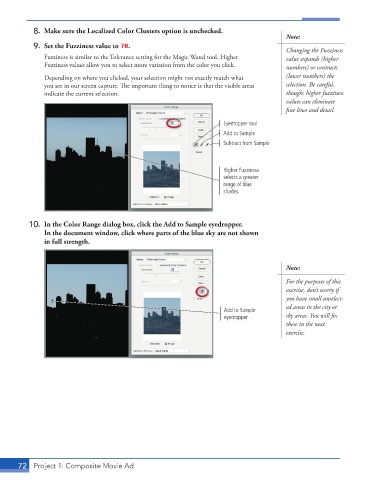
8.  Make sure the Localized Color Clusters option is unchecked.
                                                                                        Note:
          9.  Set the Fuzziness value to 70.
                                                                                        Changing the Fuzziness
               Fuzziness is similar to the Tolerance setting for the Magic Wand tool. Higher   value expands (higher
               Fuzziness values allow you to select more variation from the color you click.  numbers) or contracts
               Depending on where you clicked, your selection might not exactly match what   (lower numbers) the
               you see in our screen capture. The important thing to notice is that the visible areas   selection. Be careful,

               indicate the current selection.                                          though; higher fuzziness
                                                                                        values can eliminate

                                                                                        fine lines and detail.
                                                                     Eyedropper tool
                                                                     Add to Sample
                                                                     Subtract from Sample


                                                                     Higher Fuzziness
                                                                     selects a greater
                                                                     range of blue
                                                                     shades.


          10.  In the Color Range dialog box, click the Add to Sample eyedropper.
              In the document window, click where parts of the blue sky are not shown
              in full strength.


                                                                                        Note:

                                                                                        For the purposes of this
                                                                                        exercise, don’t worry if
                                                                                        you have small unselect-
                                                                                        ed areas in the city or
                                                                     Add to Sample

                                                                     eyedropper         sky areas. You will fix
                                                                                        these in the next
                                                                                        exercise.


       72  Project 1: Composite Movie Ad

