


Page 59 - Adobe Photoshop and Dreamviewer 2021
P. 59
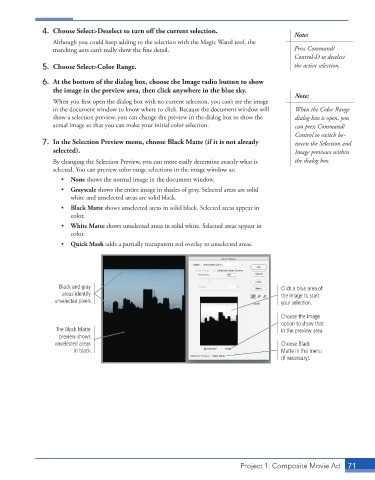
4.  Choose Select>Deselect to turn off the current selection.
                                                                                           Note:
                 Although you could keep adding to the selection with the Magic Wand tool, the
                 marching ants can’t really show the fine detail.                          Press Command/
                                                                                           Control-D to deselect
              5.  Choose Select>Color Range.                                               the active selection.

              6.  At the bottom of the dialog box, choose the Image radio button to show
                 the image in the preview area, then click anywhere in the blue sky.
                                                                                           Note:
                 When you first open the dialog box with no current selection, you can’t see the image
                 in the document window to know where to click. Because the document window will   When the Color Range
                 show a selection preview, you can change the preview in the dialog box to show the   dialog box is open, you
                 actual image so that you can make your initial color selection.           can press Command/
                                                                                           Control to switch be-
              7.  In the Selection Preview menu, choose Black Matte (if it is not already   tween the Selection and
                 selected).                                                                Image previews within
                 By changing the Selection Preview, you can more easily determine exactly what is   the dialog box.
                 selected. You can preview color range selections in the image window as:
                    •  None shows the normal image in the document window.
                    •  Grayscale shows the entire image in shades of gray. Selected areas are solid
                       white and unselected areas are solid black.
                    •  Black Matte shows unselected areas in solid black. Selected areas appear in
                       color.
                    •  White Matte shows unselected areas in solid white. Selected areas appear in
                       color.
                    •  Quick Mask adds a partially transparent red overlay to unselected areas.


                   Black and gray                                                      Click a blue area of
                    areas identify                                                     the image to start
                  unselected pixels.                                                   your selection.

                                                                                       Choose the Image
                                                                                       option to show that
                  The Black Matte                                                      in the preview area.
                   preview shows
                  unselected areas                                                     Choose Black
                        in black.                                                      Matte in this menu
                                                                                       (if necessary).


                                                                          Project 1: Composite Movie Ad    71

