


Page 62 - Adobe Photoshop and Dreamviewer 2021
P. 62
More on Selecting a Color Range


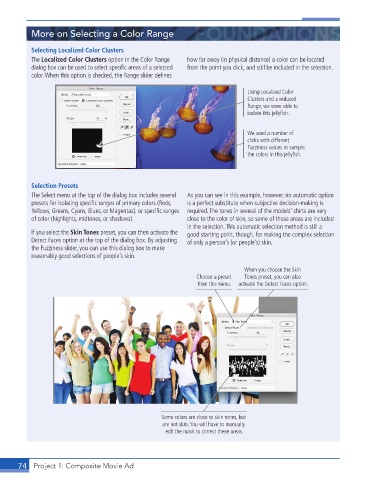
           Selecting Localized Color Clusters
           The Localized Color Clusters option in the Color Range   how far away (in physical distance) a color can be located
           dialog box can be used to select specifi c areas of a selected   from the point you click, and still be included in the selection.
           color. When this option is checked, the Range slider defi nes

                                                                             Using Localized Color
                                                                             Clusters and a reduced
                                                                             Range, we were able to
                                                                             isolate this jellyfish.


                                                                             We used a number of
                                                                             clicks with different
                                                                             Fuzziness values to sample
                                                                             the colors in this jellyfish.


           Selection Presets
           The Select menu at the top of the dialog box includes several   As you can see in this example, however, no automatic option
           presets for isolating specifi c ranges of primary colors (Reds,   is a perfect substitute when subjective decision-making is
           Yellows, Greens, Cyans, Blues, or Magentas), or specifi c ranges  required. The tones in several of the models’ shirts are very
           of color (highlights, midtones, or shadows).   close to the color of skin, so some of those areas are included
                                                          in the selection. This automatic selection method is still a
           If you select the Skin Tones preset, you can then activate the   good starting point, though, for making the complex selection
           Detect Faces option at the top of the dialog box. By adjusting   of only a person’s (or people’s) skin.
           the Fuzziness slider, you can use this dialog box to make
           reasonably good selections of people’s skin.

                                                                            When you choose the Skin
                                                             Choose a preset   Tones preset, you can also
                                                             from this menu.  activate the Detect Faces option.


                                                  Some colors are close to skin tones, but
                                                   are not skin. You will have to manually
                                                    edit the mask to correct these areas.


       74  Project 1: Composite Movie Ad

