


Page 34 - Adobe Photoshop and Dreamviewer 2021
P. 34
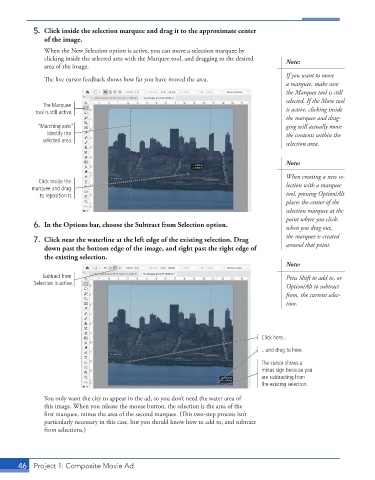
5.  Click inside the selection marquee and drag it to the approximate center
               of the image.
               When the New Selection option is active, you can move a selection marquee by
               clicking inside the selected area with the Marquee tool, and dragging to the desired   Note:
               area of the image.
                                                                                        If you want to move
               The live cursor feedback shows how far you have moved the area.
                                                                                        a marquee, make sure
                                                                                        the Marquee tool is still
                                                                                        selected. If the Move tool
              The Marquee
            tool is still active.                                                       is active, clicking inside
                                                                                        the marquee and drag-
            “Marching ants”                                                             ging will actually move
               identify the                                                             the contents within the
              selected area.
                                                                                        selection area.

                                                                                        Note:

                                                                                        When creating a new se-
             Click inside the                                                           lection with a marquee
           marquee and drag
             to reposition it.                                                          tool, pressing Option/Alt
                                                                                        places the center of the
                                                                                        selection marquee at the
                                                                                        point where you click;
           6.  In the Options bar, choose the Subtract from Selection option.           when you drag out,
                                                                                        the marquee is created
           7.  Click near the waterline at the left edge of the existing selection. Drag
               down past the bottom edge of the image, and right past the right edge of   around that point.
               the existing selection.
                                                                                        Note:
              Subtract from                                                             Press Shift to add to, or
           Selection is active.
                                                                                        Option/Alt to subtract
                                                                                        from, the current selec-
                                                                                        tion.


                                                                                 Click here...
                                                                                 ...and drag to here.
                                                                                 The cursor shows a
                                                                                 minus sign because you
                                                                                 are subtracting from
                                                                                 the existing selection.

               You only want the city to appear in the ad, so you don’t need the water area of
               this image. When you release the mouse button, the selection is the area of the
               first marquee, minus the area of the second marquee. (This two-step process isn’t
               particularly necessary in this case, but you should know how to add to, and subtract
               from selections.)


       46  Project 1: Composite Movie Ad

