


Page 32 - Adobe Photoshop and Dreamviewer 2021
P. 32
Understanding Smart Guides

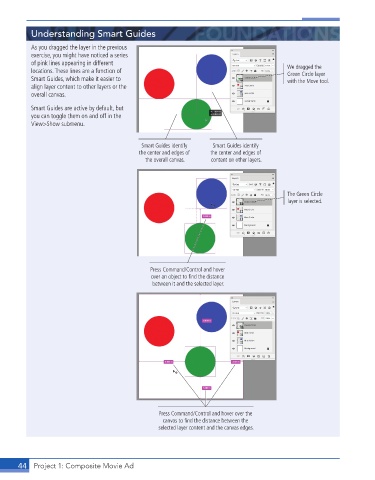
           As you dragged the layer in the previous
           exercise, you might have noticed a series
           of pink lines appearing in different
           locations. These lines are a function of                                      We dragged the
                                                                                         Green Circle layer
           Smart Guides, which make it easier to                                         with the Move tool.
           align layer content to other layers or the
           overall canvas.

           Smart Guides are active by default, but
           you can toggle them on and off in the
           View>Show submenu.


                                            Smart Guides identify   Smart Guides identify
                                           the center and edges of   the center and edges of
                                             the overall canvas.  content on other layers.


                                                                                         The Green Circle
                                                                                         layer is selected.


                                               Press Command/Control and hover
                                               over an object to find the distance
                                                between it and the selected layer.


                                                 Press Command/Control and hover over the
                                                   canvas to find the distance between the
                                                 selected layer content and the canvas edges.


       44  Project 1: Composite Movie Ad

