


Page 36 - Adobe Photoshop and Dreamviewer 2021
P. 36
Rasterize a Vector File
         Logos and title treatments — such as the ones you will use in this project — are
         commonly created as vector graphics. Although Photoshop is typically a pixel-based
         application, you can also open and work with vector graphics created in illustration
         programs like Adobe Illustrator.

           1.  With aftermath.psd open, choose File>Open and navigate to your
               WIP>Movie folder.
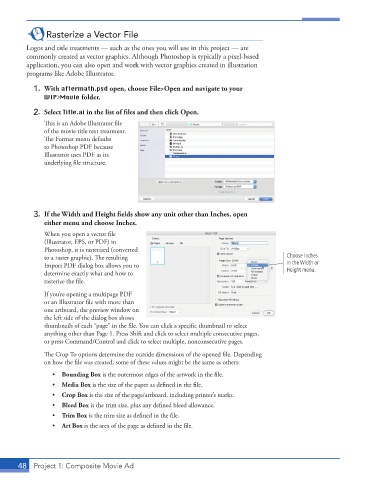
           2.  Select Title.ai in the list of files and then click Open.

               This is an Adobe Illustrator file
               of the movie title text treatment.
               The Format menu defaults
               to Photoshop PDF because
               Illustrator uses PDF as its
               underlying file structure.


           3.  If the Width and Height fields show any unit other than Inches, open
              either menu and choose Inches.
               When you open a vector file
               (Illustrator, EPS, or PDF) in
               Photoshop, it is rasterized (converted
               to a raster graphic). The resulting                                       Choose Inches
               Import PDF dialog box allows you to                                       in the Width or
               determine exactly what and how to                                         Height menu.
               rasterize the file.
               If you’re opening a multipage PDF
               or an Illustrator file with more than
               one artboard, the preview window on
               the left side of the dialog box shows
               thumbnails of each “page” in the file. You can click a specific thumbnail to select
               anything other than Page 1. Press Shift and click to select multiple consecutive pages,
               or press Command/Control and click to select multiple, nonconsecutive pages.

               The Crop To options determine the outside dimensions of the opened file. Depending
               on how the file was created, some of these values might be the same as others:
                 •  Bounding Box is the outermost edges of the artwork in the file.
                 •  Media Box is the size of the paper as defined in the file.
                 •  Crop Box is the size of the page/artboard, including printer’s marks.
                 •  Bleed Box is the trim size, plus any defined bleed allowance.
                 •  Trim Box is the trim size as defined in the file.
                 •  Art Box is the area of the page as defined in the file.


       48  Project 1: Composite Movie Ad

