


Page 38 - Adobe Photoshop and Dreamviewer 2021
P. 38
Place Files as Smart Object Layers
         As you have seen in the last few exercises, copying layer content from one file to
         another results in new regular layers for the pasted content. Photoshop also supports
         Smart Object layers, in which you place one file into another instead of pasting layer
         content. Smart Objects provide a number of advantages over regular layers, which
         you will explore later in this project. In this exercise, you will create the Smart Object
         layers for the remaining image elements.

           1.  With aftermath.psd open, choose File>Place Embedded.
               Two options in the File menu — Place Embedded and Place Linked — give you the
               option to embed the placed file data into active file, or to place smart objects as links
               to the original placed file. (See Page 53 for more about placing linked files.)

           2.  Choose the Lightning.jpg file (in your WIP>Movie folder) and click Place.

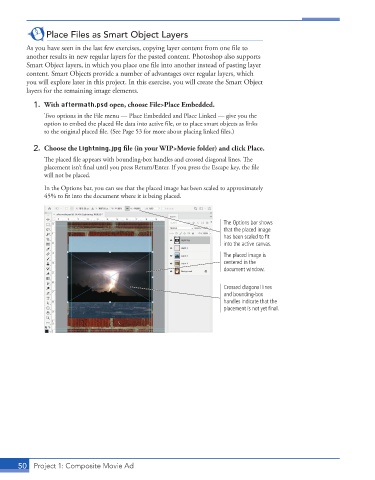
               The placed file appears with bounding-box handles and crossed diagonal lines. The
               placement isn’t final until you press Return/Enter. If you press the Escape key, the file
               will not be placed.
               In the Options bar, you can see that the placed image has been scaled to approximately
               45% to fit into the document where it is being placed.


                                                                     The Options bar shows
                                                                     that the placed image
                                                                     has been scaled to fit
                                                                     into the active canvas.
                                                                     The placed image is
                                                                     centered in the
                                                                     document window.

                                                                     Crossed diagonal lines
                                                                     and bounding-box
                                                                     handles indicate that the
                                                                     placement is not yet final.


       50  Project 1: Composite Movie Ad

