


Page 30 - Adobe Photoshop and Dreamviewer 2021
P. 30
7.  Click the Close button on the Storm.jpg document tab to close that file.
               After closing the storm file, the aftermath.psd document window expands to fill the
               available space.
               If you remember from the Image Size dialog box, the storm image was 17.1″ 1 11.4″
               at 180 ppi. Photoshop cannot maintain multiple resolutions in a single file. When you
               move the image content into the aftermath file, it adopts the resolution of the target
               file (in this case, 300 ppi). The concept of effective resolution transforms the storm
               image/layer to approximately 10.25″ 1 6.825″ at 300 ppi.

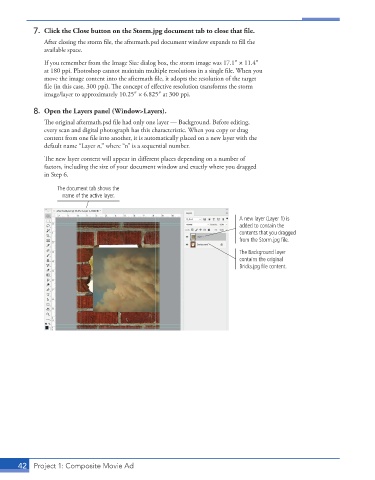
           8.  Open the Layers panel (Window>Layers).
               The original aftermath.psd file had only one layer — Background. Before editing,
               every scan and digital photograph has this characteristic. When you copy or drag
               content from one file into another, it is automatically placed on a new layer with the
               default name “Layer n,” where “n” is a sequential number.

               The new layer content will appear in different places depending on a number of
               factors, including the size of your document window and exactly where you dragged
               in Step 6.

                   The document tab shows the
                    name of the active layer.


                                                                          A new layer (Layer 1) is
                                                                          added to contain the
                                                                          contents that you dragged
                                                                          from the Storm.jpg file.
                                                                          The Background layer
                                                                          contains the original
                                                                          Bricks.jpg file content.


       42  Project 1: Composite Movie Ad

