


Page 39 - Adobe Photoshop and Dreamviewer 2021
P. 39
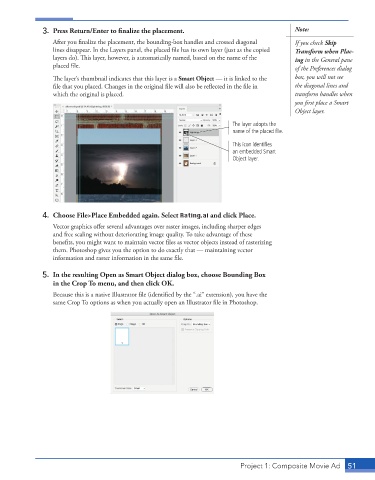
3.  Press Return/Enter to finalize the placement.                            Note:
                 After you finalize the placement, the bounding-box handles and crossed diagonal   If you check Skip
                 lines disappear. In the Layers panel, the placed file has its own layer (just as the copied   Transform when Plac-
                 layers do). This layer, however, is automatically named, based on the name of the   ing in the General pane
                 placed file.                                                              of the Preferences dialog
                 The layer’s thumbnail indicates that this layer is a Smart Object — it is linked to the   box, you will not see
                 file that you placed. Changes in the original file will also be reflected in the file in   the diagonal lines and
                 which the original is placed.                                             transform handles when
                                                                                           you first place a Smart
                                                                                           Object layer.

                                                                        The layer adopts the
                                                                        name of the placed file.

                                                                        This icon identifies
                                                                        an embedded Smart
                                                                        Object layer.


              4.  Choose File>Place Embedded again. Select Rating.ai and click Place.
                 Vector graphics offer several advantages over raster images, including sharper edges
                 and free scaling without deteriorating image quality. To take advantage of these
                 benefits, you might want to maintain vector files as vector objects instead of rasterizing
                 them. Photoshop gives you the option to do exactly that — maintaining vector
                 information and raster information in the same file.


              5.  In the resulting Open as Smart Object dialog box, choose Bounding Box
                 in the Crop To menu, and then click OK.
                 Because this is a native Illustrator file (identified by the “.ai” extension), you have the
                 same Crop To options as when you actually open an Illustrator file in Photoshop.


                                                                          Project 1: Composite Movie Ad    51

