


Page 56 - CC 2019 GD Look Inside
P. 56
Transforming Objects with the Bounding Box

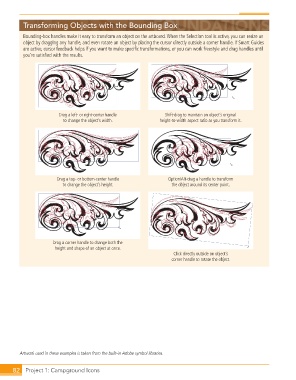
               Bounding-box handles make it easy to transform an object on the artboard. When the Selection tool is active, you can resize an
               object by dragging any handle, and even rotate an object by placing the cursor directly outside a corner handle. If Smart Guides
               are active, cursor feedback helps if you want to make specific transformations, or you can work freestyle and drag handles until
               you’re satisfied with the results.


                             Drag a left- or right-center handle      Shift-drag to maintain an object’s original
                               to change the object’s width.        height-to-width aspect ratio as you transform it.


                            Drag a top- or bottom-center handle        Option/Alt-drag a handle to transform
                              to change the object’s height.            the object around its center point.


                           Drag a corner handle to change both the
                           height and shape of an object at once.
                                                                         Click directly outside an object’s
                                                                        corner handle to rotate the object.


              Artwork used in these examples is taken from the built-in Adobe symbol libraries.


           82   Project 1: Campground Icons

