


Page 54 - CC 2019 GD Look Inside
P. 54
Draw with Live Shapes

              In addition to using the Transform panel to edit the properties of Live Shapes, you
              can also use the tool cursor to edit those shapes without the need to constantly
              switch tools. In this exercise, you will create and edit two more live shapes to
              complete the Hiking icon artwork.

                1.  With icons.ai open, deselect everything on the artboard.

                2.  Choose the Rectangle tool, and define a 1-pt black stroke with no fill.  Note:

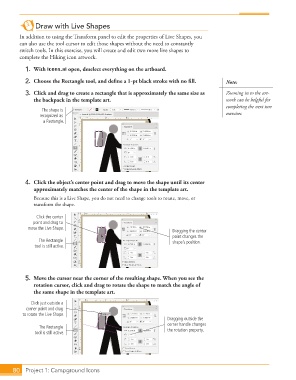
                3.  Click and drag to create a rectangle that is approximately the same size as   Zooming in to the art-
                   the backpack in the template art.                                         work can be helpful for
                                                                                             completing the next two
                      The shape is
                      recognized as                                                          exercises.
                       a Rectangle.


                4.  Click the object’s center point and drag to move the shape until its center
                   approximately matches the center of the shape in the template art.
                   Because this is a Live Shape, you do not need to change tools to rotate, move, or
                   transform the shape.

                    Click the center
                   point and drag to
                 move the Live Shape.
                                                                        Dragging the center
                                                                        point changes the
                     The Rectangle                                      shape’s position.
                    tool is still active.


                5.  Move the cursor near the corner of the resulting shape. When you see the
                   rotation cursor, click and drag to rotate the shape to match the angle of
                   the same shape in the template art.

                  Click just outside a
                corner point and drag
               to rotate the Live Shape.
                                                                      Dragging outside the
                                                                      corner handle changes
                     The Rectangle                                    the rotation property.
                    tool is still active.


           80   Project 1: Campground Icons

