


Page 29 - CS6_ID_Look_Inside
P. 29
create a rounded rectangle
                  In addition to basic rectangles, you can create frames with a number of special corner
                  treatments. The Rounded Rectangle tool automatically creates frames with special
                  corners, but you can also easily modify the corners of an existing frame to create the
                  effect you want.
                    1.  With identity.indd open, zoom into the left end of the black rectangle.
                                                                                                 Note:
                    2.  Click away from the existing shape to deselect it (if necessary).        When an object is
                        To deselect objects, you can choose Edit>Deselect All, or simply click an empty area   selected, changing the fill
                        of the workspace. If you do click the workspace, though, be careful that you don't   and stroke values changes
                        accidentally click a white-filled object instead of the empty page or pasteboard area.  those attributes for the

                        If you don’t deselect the existing shape, the changes you make in the next step would   selected object. If you
                        affect the selected object.                                              change the fill or stroke
                                                                                                 color value with no
                    3.  Make sure the Rectangle tool is active.                                  object selected, you define
                                                                                                 the values for the next
                    4.  In the Control panel, click the arrow button to the right of the Fill swatch   object you create.
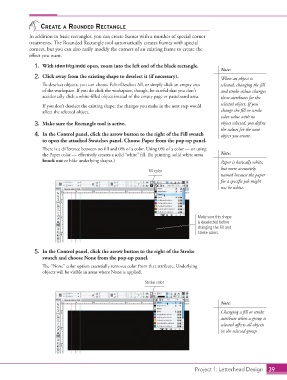
                        to open the attached Swatches panel. Choose Paper from the pop-up panel.

                        There is a difference between no fill and 0% of a color. Using 0% of a color — or using
                        the Paper color — effectively creates a solid “white” fill. (In printing, solid white areas   Note:
                        knock out or hide underlying shapes.)                                    Paper is basically white,
                                                                                                 but more accurately
                                                                   Fill color
                                                                                                 named because the paper
                                                                                                 for a specific job might
                                                                                                 not be white.


                                                                                       Make sure this shape
                                                                                       is deselected before
                                                                                       changing the Fill and
                                                                                       Stroke colors.


                    5.  In the Control panel, click the arrow button to the right of the Stroke
                        swatch and choose None from the pop-up panel.

                        The “None” color option essentially removes color from that attribute. Underlying
                        objects will be visible in areas where None is applied.

                                                                  Stroke color


                                                                                                 Note:
                                                                                                 Changing a fill or stroke
                                                                                                 attribute when a group is
                                                                                                 selected affects all objects
                                                                                                 in the selected group.


                                                                                      Project 1: Letterhead Design  39

