


Page 34 - CS6_ID_Look_Inside
P. 34
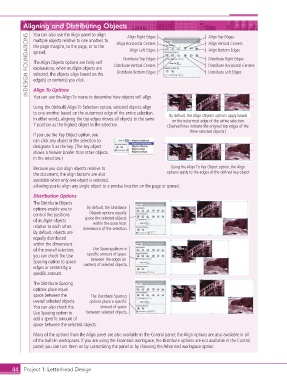
Aligning and Distributing Objects          Align Right Edges                Align Top Edges

                    You can also use the Align panel to align
                  INDESIGN FOUNDATIONS  the page margins, to the page, or to the   Distribute Vertical Centers  Align Bottom Edges
                    multiple objects relative to one another, to
                                                                                            Align Vertical Centers
                                                      Align Horizontal Centers
                                                            Align Left Edges
                    spread.
                                                         Distribute Top Edges
                                                                                            Distribute Right Edges
                    The Align Objects options are fairly self
                                                                                            Distribute Horizontal Centers
                    explanatory; when multiple objects are
                                                                                            Distribute Left Edges
                                                      Distribute Bottom Edges
                    selected, the objects align based on the
                    edge(s) or center(s) you click.
                    Align To Options
                    You can use the Align To menu to determine how objects will align.
                    Using the (default) Align To Selection option, selected objects align
                    to one another based on the outermost edge of the entire selection.   By default, the Align Objects options apply based
                    In other words, aligning the top edges moves all objects to the same   on the outermost edge of the active selection.
                    Y position as the highest object in the selection.     (Dashed lines indicate the original top edges of the
                                                                                    three selected objects.)
                    If you use the Key Object option, you
                    can click any object in the selection to
                    designate it as the key. (The key object
                    shows a heavier border than other objects
                    in the selection.)

                    Because you can align objects relative to               Using the Align To Key Object option, the Align
                    the document, the align buttons are also               options apply to the edges of the defined key object.
                    available when only one object is selected,
                    allowing you to align any single object to a precise location on the page or spread.

                    Distribution Options
                    The Distribute Objects
                    options enable you to   By default, the Distribute
                    control the positions   Objects options equally
                    of multiple objects   space the selected objects
                                             within the outermost
                    relative to each other.   dimensions of the selection.
                    By default, objects are
                    equally distributed
                    within the dimensions
                    of the overall selection;   Use Spacing places a
                    you can check the Use   specific amount of space
                    Spacing option to space   between the edges (or
                    edges or centers by a   centers) of selected objects.
                    specific amount.

                    The Distribute Spacing
                    options place equal
                    space between the       The Distribute Spacing
                    overall selected objects.   options place a specific
                    You can also check the     amount of space
                    Use Spacing option to   between selected objects.
                    add a specific amount of
                    space between the selected objects.
                    Many of the options from the Align panel are also available in the Control panel; the Align options are also available in all
                    of the built-in workspaces. If you are using the Essentials workspace, the Distribute options are not available in the Control
                    panel; you can turn them on by customizing the panel or by choosing the Advanced workspace option.


           44 Project 1: Letterhead Design

