


Page 25 - CS6_ID_Look_Inside
P. 25
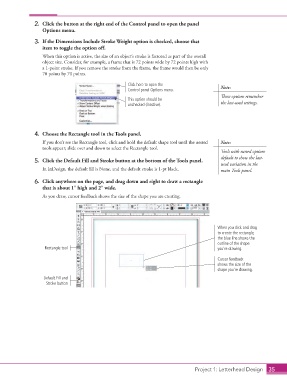
2.  Click the button at the right end of the Control panel to open the panel
                        Options menu.

                    3.  If the Dimensions Include Stroke Weight option is checked, choose that
                        item to toggle the option off.
                        When this option is active, the size of an object’s stroke is factored as part of the overall
                        object size. Consider, for example, a frame that is 72 points wide by 72 points high with
                        a 1-point stroke. If you remove the stroke from the frame, the frame would then be only
                        70 points by 70 points.
                                                           Click here to open the
                                                           Control panel Options menu.           Note:
                                                                                                 These options remember
                                                           This option should be
                                                           unchecked (inactive).                 the last-used settings.


                    4.  Choose the Rectangle tool in the Tools panel.
                        If you don’t see the Rectangle tool, click and hold the default shape tool until the nested   Note:
                        tools appear; slide over and down to select the Rectangle tool.
                                                                                                 Tools with nested options
                                                                                                 default to show the last-
                    5.  Click the Default Fill and Stroke button at the bottom of the Tools panel.
                                                                                                 used variation in the
                        In InDesign, the default fill is None, and the default stroke is 1-pt black.  main Tools panel.

                    6.  Click anywhere on the page, and drag down and right to draw a rectangle
                        that is about 1″ high and 2″ wide.

                        As you draw, cursor feedback shows the size of the shape you are creating.


                                                                                                When you click and drag
                                                                                                to create the rectangle,
                                                                                                the blue line shows the
                                                                                                outline of the shape
                         Rectangle tool                                                         you’re drawing.

                                                                                                Cursor feedback
                                                                                                shows the size of the
                                                                                                shape you’re drawing.
                        Default Fill and
                         Stroke button


                                                                                      Project 1: Letterhead Design  35

