


Page 20 - CS6_ID_Look_Inside
P. 20
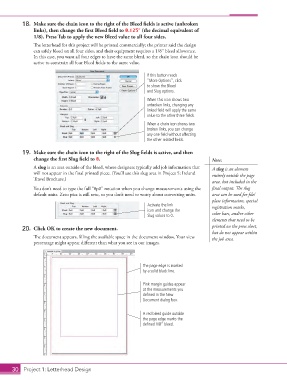
18.  Make sure the chain icon to the right of the Bleed fields is active (unbroken
                    links), then change the first Bleed field to 0.125” (the decimal equivalent of
                    1/8). Press Tab to apply the new Bleed value to all four sides.
                    The letterhead for this project will be printed commercially; the printer said the design
                    can safely bleed on all four sides, and their equipment requires a 1/8″ bleed allowance.
                    In this case, you want all four edges to have the same bleed, so the chain icon should be
                    active to constrain all four Bleed fields to the same value.

                                                                   If this button reads
                                                                   “More Options”, click
                                                                   to show the Bleed
                                                                   and Slug options.
                                                                   When this icon shows two
                                                                   unbroken links, changing any
                                                                   linked field will apply the same
                                                                   value to the other three fields.
                                                                   When a chain icon shows two
                                                                   broken links, you can change
                                                                   any one field without affecting
                                                                   the other related fields.


                19.  Make sure the chain icon to the right of the Slug fields is active, and then
                    change the first Slug field to 0.                                        Note:
                    A slug is an area outside of the bleed, where designers typically add job information that   A slug is an element
                    will not appear in the final printed piece. (You’ll use this slug area in Project 5: Ireland   entirely outside the page
                    Travel Brochure.)
                                                                                             area, but included in the
                    You don’t need to type the full “0p0” notation when you change measurements using the   final output. The slug
                    default units. Zero pica is still zero, so you don’t need to worry about converting units.  area can be used for file/
                                                                                             plate information, special
                                                                   Activate the link         registration marks,
                                                                   icon and change the
                                                                   Slug values to 0.         color bars, and/or other
                                                                                             elements that need to be
                20.  Click OK to create the new document.                                    printed on the press sheet,
                                                                                             but do not appear within
                    The document appears, filling the available space in the document window. Your view   the job area.
                    percentage might appear different than what you see in our images.


                                                                 The page edge is marked
                                                                 by a solid black line.

                                                                 Pink margin guides appear
                                                                 at the measurements you
                                                                 defined in the New
                                                                 Document dialog box.


                                                                 A red bleed guide outside
                                                                 the page edge marks the
                                                                 defined 1/8” bleed.


           30 Project 1: Letterhead Design

