


Page 70 - CC 2019 ID Look Inside
P. 70
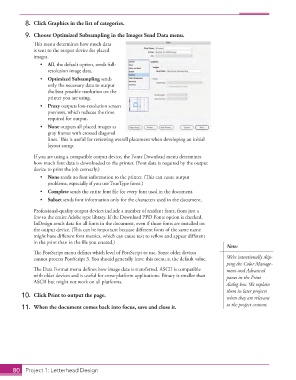
8.  Click Graphics in the list of categories.

               9.  Choose Optimized Subsampling in the Images Send Data menu.
                   Th  is menu determines how much data
                   is sent to the output device for placed
                   images.
                      •  All, the default option, sends full-
                         resolution image data.
                      •  Optimized Subsampling sends
                         only the necessary data to output
                         the best possible resolution on the
                         printer you are using.
                      •  Proxy outputs low-resolution screen
                         previews, which reduces the time
                         required for output.
                      •  None outputs all placed images as
                         gray frames with crossed diagonal
                         lines. Th  is is useful for reviewing overall placement when developing an initial
                         layout comp.

                   If you are using a compatible output device, the Fonts Download menu determines
                   how much font data is downloaded to the printer. (Font data is required by the output
                   device to print the job correctly.)
                      •  None sends no font information to the printer. (Th  is can cause output
                         problems, especially if you use TrueType fonts.)
                      •  Complete sends the entire font fi le for every font used in the document.
                      •  Subset sends font information only for the characters used in the document.

                   Professional-quality output devices include a number of resident fonts, from just a
                   few to the entire Adobe type library. If the Download PPD Fonts option is checked,
                   InDesign sends data for all fonts in the document, even if those fonts are installed on
                   the output device. (Th  is can be important because diff erent fonts of the same name
                   might have diff erent font metrics, which can cause text to refl ow and appear diff erent
                   in the print than in the fi le you created.)
                                                                                             Note:
                   Th  e PostScript menu defi nes which level of PostScript to use. Some older devices
                   cannot process PostScript 3. You should generally leave this menu at the default value.  We’re intentionally skip-
                                                                                             ping the Color Manage-
                   Th  e Data Format menu defi nes how image data is transferred. ASCII is compatible   ment and Advanced
                   with older devices and is useful for cross-platform applications. Binary is smaller than   panes in the Print
                   ASCII but might not work on all platforms.                                dialog box. We explain
                                                                                             them in later projects
               10.  Click Print to output the page.                                          when they are relevant

               11.  When the document comes back into focus, save and close it.              to the project content.


           80     Project 1: Letterhead Design

